
SUBLIMATION

Automatic cutting lines

Add the contours. Choose their color.

Enable cutting lines, choose a color distinct from the artwork, and review contour offset and piece spacing.

PDF pattern layout, from roll width to cut lines0:59

01

Enable lines and choose a color.

After loading the files, turn on cutting lines and use the line-color control to select the desired color.

Set paper width for the actual roll, such as 1820 mm. Consider cutting lines and clear spacing together for the next production step.

02

Inspect contours and offset.

Review cut-line offset in the additional PDF settings. Set it for the cutting process, generate a layout and inspect every contour.

Before export, check line completeness, visibility and the required gap between neighboring pieces.
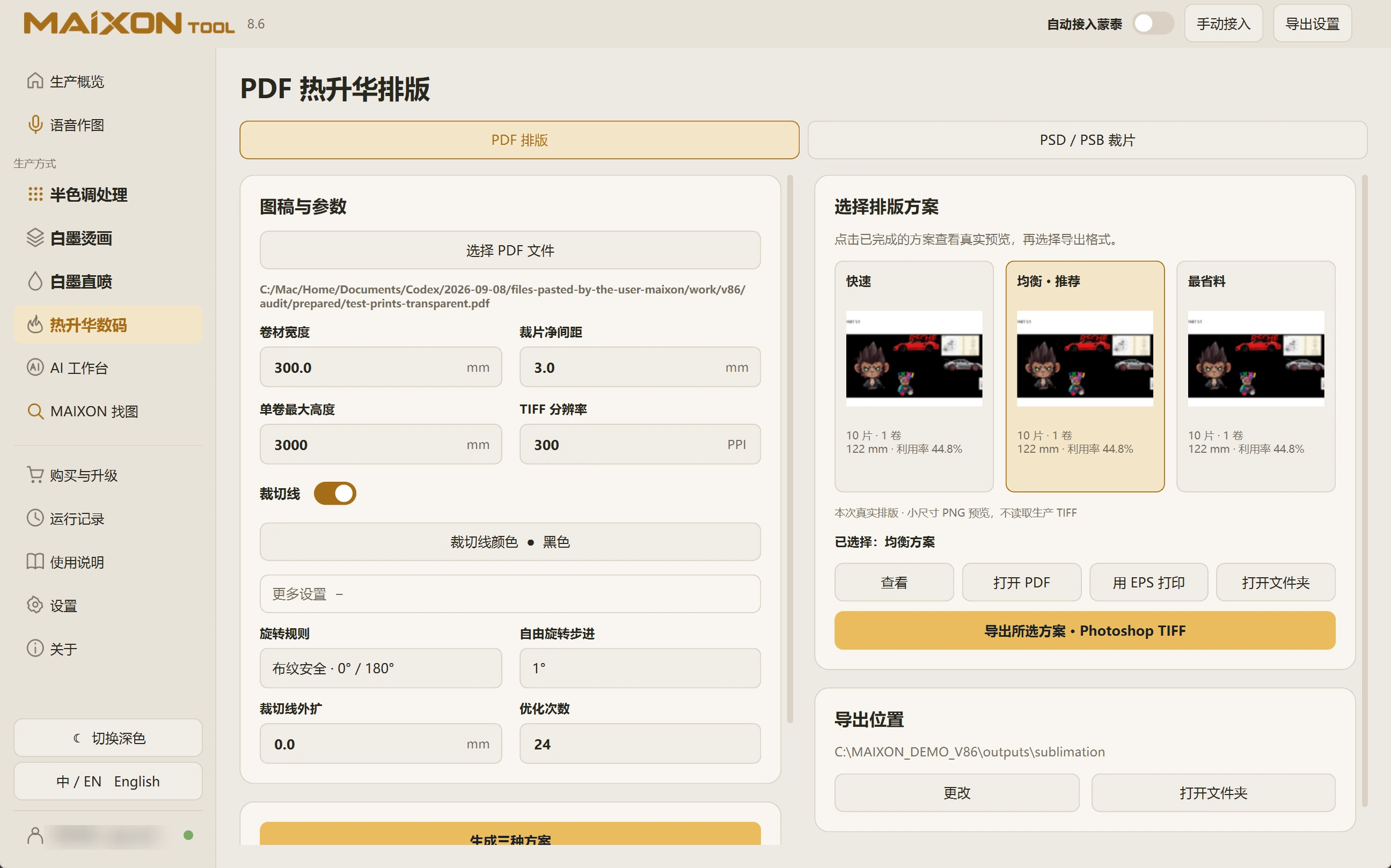
MAIXON TOOL V8.6 Automatic cutting lines — light interface
Automatic cutting lines

Keep exploring.

Choose your operating system

Select the version that matches your computer.

  1. 01

    Windows 7

    V8.3

    Download
  2. 02

    Windows 10

    V8.3

    Download
  3. 03

    Windows 11

    V8.3

    Download
  4. 04

    macOS

    Coming Soon