
DTG

Dark-fabric preparation

Let the fabric color take part in the design.

Choose the dark-fabric workflow, set regular and black-region white ink separately, then prepare dimensions, channels and output.

AI artwork to DTG and MainTop0:52

01

Choose the dark-fabric workflow.

Open the intended Photoshop artwork and select Dark Fabric in DTG. Base the choice on the actual substrate and design.

Set white ink for regular and black regions independently, considering the fabric color and required coverage.

02

Inspect artwork and white ink.

Review the channel name, width, PPI, W1 choke and margins. Choose an output folder and run the task.

Inspect both color artwork and the white channel, then continue into MainTop and test on the actual fabric.
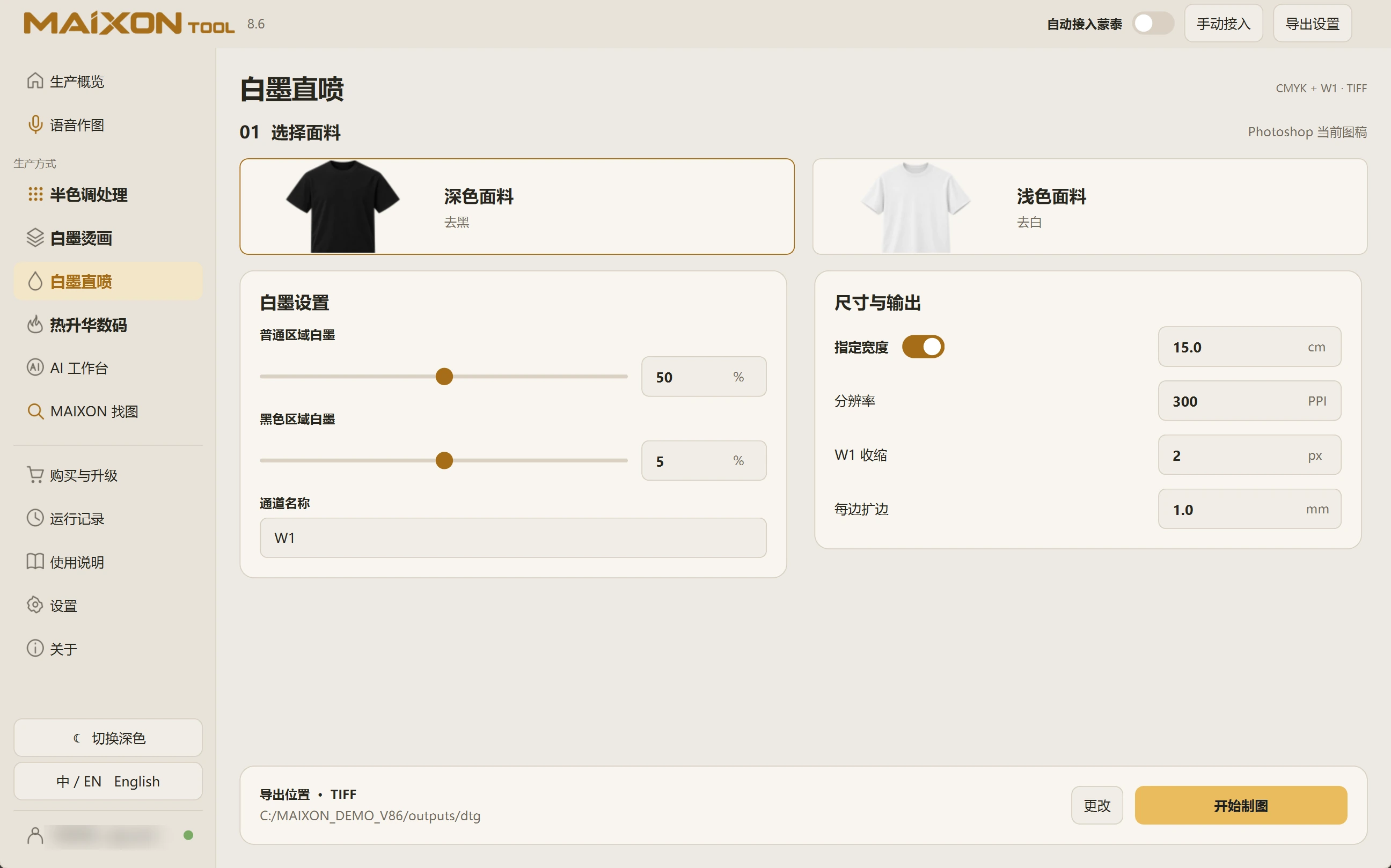
MAIXON TOOL V8.6 Dark-fabric preparation — light interface
Dark-fabric preparation
MAIXON × MainTopArtwork prepared. Continue into MainTop.

Keep exploring.

Choose your operating system

Select the version that matches your computer.

  1. 01

    Windows 7

    V8.3

    Download
  2. 02

    Windows 10

    V8.3

    Download
  3. 03

    Windows 11

    V8.3

    Download
  4. 04

    macOS

    Coming Soon